Here is an example which defines a class of Books type:
</pre>
<?php
 class Books{
 /* Member variables */
 var $price;
 var $title;
 /* Member functions */
 function setPrice($par){
 $this->price = $var;
 }
 function getPrice(){
 echo $this->price ."<br/>";
 }
 function setTitle($par){
 $this->title = $par;
 }
 function getTitle(){
 echo $this->title ." <br/>";
 }
 }
 ?>
Creating Objects in PHP
Once you defined your class, then you can create as many objects as you like of that class type. Following is an example of how to create object using new operator.
$physics = new Books; $maths = new Books; $chemistry = new Books; |
Here we have created three objects and these objects are independent of each other and they will have their existance separately. Next we will see how to access member function and process member variables.
Calling Member Functions
After creating your objects, you will be able to call member functions related to that object. One member function will be able to process member variable of related object only.
Following example shows how to set title and prices for the three books by calling member functions.
$physics->setTitle( "Physics for High School" ); $chemistry->setTitle( "Advanced Chemistry" ); $maths->setTitle( "Algebra" ); $physics->setPrice( 10 ); $chemistry->setPrice( 15 ); $maths->setPrice( 7 ); |
Now you call another member functions to get the values set by in above example:
$physics->getTitle(); $chemistry->getTitle(); $maths->getTitle(); $physics->getPrice(); $chemistry->getPrice(); $maths->getPrice(); |
This will produce follwoing result:
Physics for High School Advanced Chemistry Algebra 10 15 7 |
Constructor Functions:
Constructor Functions are special type of functions which are called automatically whenever an object is created. So we take full advantage of this behaviour, by initializing many things through constructor functions.
PHP provides a special function called __construct() to define a constructor. You can pass as many as arguments you like into the constructor function.
Following example will create one constructor for Books class and it will initialize price and title for the book at the time of object creation.
function __construct( $par1, $par2 ){
   $this->price = $par1;
   $this->title = $par2;
}
|
Now we don't need to call set function separately to set price and title. We can initialize these two member variables at the time of object creation only. Check following example below:
   $physics = new Books( "Physics for High School", 10 );
   $maths = new Books ( "Advanced Chemistry", 15 );
   $chemistry = new Books ("Algebra", 7 );

   /* Get those set values */
   $physics->getTitle();
   $chemistry->getTitle();
   $maths->getTitle();

   $physics->getPrice();
   $chemistry->getPrice();
   $maths->getPrice();
|
This will produce following result:
Physics for High School Advanced Chemistry Algebra 10 15 7 |
Destructor:
Like a constructor function you can define a destructor function using function __destruct(). You can release all the resourceses with-in a destructor.
Inheritance:
PHP class definitions can optionally inherit from a parent class definition by using the extends clause. The syntax is as follows:
  class Child extends Parent {
     <definition body>
  }
|
The effect of inheritance is that the child class (or subclass or derived class) has the following characteristics:
- Automatically has all the member variable declarations of the parent class.
- Automatically has all the same member functions as the parent, which (by default) will work the same way as those functions do in the parent.
Following example inherit Books class and adds more functionality based on the requirement.
class Novel extends Books{
   var publisher;
   function setPublisher($par){
     $this->publisher = $par;
   }
   function getPublisher(){
     echo $this->publisher. "<br />";
   }
}
|
Now apart from inherited functions, class Novel keeps two additional member functions.
Function Overriding:
Function definitions in child classes override definitions with the same name in parent classes. In a child class, we can modify the definition of a function inherited from parent class.
In the follwoing example getPrice and getTitle functions are overriden to retrun some values.
    function getPrice(){
       echo $this->price . "<br/>";
       return $this->price;
    }
    function getTitle(){
       echo $this->title . "<br/>";
       return $this->title;
    }
|
Public Members:
Unless you specify otherwise, properties and methods of a class are public. That is to say, they may be accessed in three possible situations:
- From outside the class in which it is declared
- From within the class in which it is declared
- From within another class that implements the class in which it is declared
Till now we have seen all members as public members. If you wish to limit the accessibility of the members of a class then you define class members as private or protected.
Private members:
By designating a member private, you limit its accessibility to the class in which it is declared. The private member cannot be referred to from classes that inherit the class in which it is declared and cannot be accessed from outside the class.
A class member can be made private by using private keyword infront of the member.
class MyClass {
   private $car = "skoda";
   $driver = "SRK";

   function __construct($par) {
      // Statements here run every time
      // an instance of the class
      // is created.
   }
   function myPublicFunction() {
      return("I'm visible!");
   }
   private function myPrivateFunction() {
      return("I'm  not visible outside!");
   }
}
|
When MyClass class is inherited by another class using extends, myPublicFunction() will be visible, as will $driver. The extending class will not have any awareness of or access to myPrivateFunction and $car, because they are declared private.
Protected members:
A protected property or method is accessible in the class in which it is declared, as well as in classes that extend that class. Protected members are not available outside of those two kinds of classes. A class member can be made protected by using protected keyword infront of the member.
Here is different version of MyClass:
class MyClass {
   protected $car = "skoda";
   $driver = "SRK";

   function __construct($par) {
      // Statements here run every time
      // an instance of the class
      // is created.
   }
   function myPublicFunction() {
      return("I'm visible!");
   }
   protected function myPrivateFunction() {
      return("I'm  visible in child class!");
   }
}
|
Interfaces:
Interfaces are defined to provide a common function names to the implementors. Different implementors can implement those interfaces according to theri requirements. You can say, interfaces are skeltons which are implemented by developers.
As of PHP5, it is possible to define an interface, like this:
interface Mail {
   public function sendMail();
}
|
Then, if another class implemented that interface, like this:
class Report implements Mail {
   // sendMail() Definition goes here
}
|
Constants:
A constant is somewhat like a variable, in that it holds a value, but is really more like a function because a constant is immutable. Once you declare a constant, it does not change.
Declaring one constant is easy, as is done in this version of MyClass:
class MyClass {
   const requiredMargin = 1.7;
   function __construct($incomingValue) {
      // Statements here run every time
      // an instance of the class
      // is created.
   }
}
|
In this class, requiredMargin is a constant. It is declared with the keyword const, and under no circumstances can it be changed to anything other than 1.7. Note that the constant's name does not have a leading $, as variable names do.
Abstract Classes:
An abstract class is one that cannot be instantiated, only inherited. You declare an abstract class with the keyword abstract, like this:
When inheriting from an abstract class, all methods marked abstract in the parent's class declaration must be defined by the child; additionally, these methods must be defined with the same visibillity.
abstract class MyAbstractClass {
   abstract function myAbstractFunction() {
   }
}
|
Note that function definitions inside an abstract class must also be preceded by the keyword abstract. It is not legal to have abstract function definitions inside a non-abstract class.
Static Keyword:
Declaring class members or methods as static makes them accessible without needing an instantiation of the class. A member declared as static can not be accessed with an instantiated class object (though a static method can).
Try out following example:
<?php
class Foo
{
    public static $my_static = 'foo';

    public function staticValue() {
        return self::$my_static;
    }
}
print Foo::$my_static . "\n";
$foo = new Foo();
print $foo->staticValue() . "\n";
|
Final Keyword:
PHP 5 introduces the final keyword, which prevents child classes from overriding a method by prefixing the definition with final. If the class itself is being defined final then it cannot be extended.
Following example results in Fatal error: Cannot override final method BaseClass::moreTesting()
<?php
class BaseClass {
   public function test() {
       echo "BaseClass::test() called<br>";
   }

   final public function moreTesting() {
       echo "BaseClass::moreTesting() called<br>";
   }
}

class ChildClass extends BaseClass {
   public function moreTesting() {
       echo "ChildClass::moreTesting() called<br>";
   }
}
?>
|
Calling parent constructors:
Instead of writing an entirely new constructor for the subclass, let's write it by calling the parent's constructor explicitly and then doing whatever is necessary in addition for instantiation of the subclass. Here's a simple example:
class Name
{
   var $_firstName;
   var $_lastName;
   function Name($first_name, $last_name)
   {
     $this->_firstName = $first_name;
     $this->_lastName = $last_name;
   }
   function toString() {
     return($this->_lastName .", " .$this->_firstName);
   }
}
class NameSub1 extends Name
{
   var $_middleInitial;
   function NameSub1($first_name, $middle_initial, $last_name) {
       Name::Name($first_name, $last_name);
       $this->_middleInitial = $middle_initial;
   }
   function toString() {
       return(Name::toString() . " " . $this->_middleInitial);
   }
}
Reference : http://www.tutorialspoint.com/php/php_object_oriented.htm
]]>PHP class (connection.php)
<?php</pre>
//create a class for connecting a database
Class connect
{
//Use your DB connection details in here i have used a MySQL connection
Var $HostName ="";
Var $Schema = "";
Var $username ="";
Var $Password = "";
Var $con2;
//create the connect function
function connectDB()
{
$con = mysql_connect($this->HostName,$this->username,$this->Password);
$this->con2 =$con;
if (!$con)
{
die('Could not connect: ' . mysql_error());
}
else
{
//echo "You have successfully connected to the database !! ";
}
}
//create function for select database
function selectDB()
{
mysql_select_db($this->Schema);
//echo "</br> successfully selected the DB!!";
if (mysql_error())
{
print "Database ERROR: " . mysql_error();
}
}
//functon insert
function insert2($appID,$cusID , $date ,$hour, $min , $ampm, $venue, $description ,$progress , $deal , $plan)
{
$sql = " INSERT INTO appoinments";
$sql .= " (appID , cusID , date ,hour, min , ampm, venue, description , progress , deal ,plan)VALUES";
$sql .= " ('','$cusID','$date','$hour','$min','$ampm','$venue','$description','$progress','','$plan') ";
#execute SQL statement
$result = mysql_query($sql,$this->con2);
//echo "</br>$sql </br>" ;
mysql_error();
}
//function for search customer IDS
function searchID($cusName)
{
$rowcount=0;
$sql = "Select * from customer where name='".$cusName ."'";
$result = mysql_query($sql,$this->con2);
// echo "<hr/>";
echo "<center><table width='800' cellpadding='2' border =0>";
echo "<tr bgcolor='#02a7ec' > <td><b>CusID</b></td><td><b>Title</b> </td><td><b>Initial </b></td><td><b> Name</b></td> <td><b> Desig</b></td> <td><b> NIC</b></td> <td><b>B'day </b></td><td><b>Address1 </b></td><td><b>Address2 </b></td><td><b>Mobile1 </b></td><td><b>Mobile2 </b></td><td><b>Work Ph. </b></td><td><b>Home Ph. </b></td><td><b>Mail1 </b></td><td><b>Mail2 </b></td> <td><b>FB </b></td><td><b>Google </b></td><td><b>Skype </b></td><td><b>Description </b></td><td><b>Joined Date </b></td></tr>";
while($row = mysql_fetch_array( $result ))
{
echo "<form name='form". $rowcount ."' action='deleteEditmakeApp.php' method='post'>";
if ($rowcount%2==1)
{
$rowcol ="#c7ebfa";
}
else if($rowcount%2==0)
{
$rowcol ="#86d7f9";
}
echo "<tr bgcolor='".$rowcol."'>";
echo "<td>";
echo "<input type='text' name='cusID' size='3px' value='".$row['CusID']."'>";
echo "</td>";
echo "<td>";
echo $row['title'];
echo "</td>";
echo "<td>";
echo $row['initial'];
echo "</td>";
echo "<td>";
echo $row['name'];
echo "</td>";
echo "<td>";
echo $row['desig'];
echo "</td>";
echo "<td>";
echo $row['NIC'];
echo "</td>";
echo "<td>";
echo $row['date']."/".$row['month']."/".$row['year'];
echo "</td>";
echo "<td>";
echo $row['address1'];
echo "</td>";
echo "<td>";
echo $row['address2'];
echo "</td>";
echo "<td>";
echo $row['mobil1'];
echo "</td>";
echo "<td>";
echo $row['mobile2'];
echo "</td>";
echo "<td>";
echo $row['work'];
echo "</td>";
echo "<td>";
echo $row['home'];
echo "</td>";
echo "<td>";
echo $row['email1'];
echo "</td>";
echo "<td>";
echo $row['email2'];
echo "</td>";
echo "<td>";
echo $row['fb'];
echo "</td>";
echo "<td>";
echo $row['gt'];
echo "</td>";
echo "<td>";
echo $row['skp'];
echo "</td>";
echo "<td>";
echo $row['other'];
echo "</td>";
echo "<td>";
echo $row['currDate'];
echo "</td>";
echo "</tr></form>";
$rowcount = $rowcount +1;
}
echo "</table ></center>";
//echo "<hr/>";
}
function selectAllcusByID($q)
{
$sql = "Select * from customer where cusID='".$q ."'";
$result = mysql_query($sql,$this->con2);
$count = 0;
while($row = mysql_fetch_array($result))
{
$count = $count +1;
}
if($count>0)
{
echo "<img src='validating/true.png'> <font color='green'>Ok there is a customer in this ID!! </font>";
}
else
{
echo "<img src='validating/false.png'> <font color='red'>Sory there is no customer found in this ID </font>";
}
}
function filterAppDate($date1 ,$date2)
{
$rowcount =0;
$formcount=0;
$sql = "Select * from appoinments WHERE `date` BETWEEN '".$date1."' AND '".$date2."' " ;
$result = mysql_query($sql,$this->con2);
echo "<center><table width='800' cellpadding='5' border =0> ";
echo "<tr bgcolor='#02a7ec' > <td><b>appID</b></td><td><b>Date</b> </td><td><b>Time </b></td><td><b> Venue</b></td> <td><b>Description </b></td><td><b>Progress </b></td><td><b>Deal </b></td><td><b>Delete </b></td><td><b>Edit </b></td></tr>";
while($row = mysql_fetch_array( $result ))
{
echo "<form name='form". $rowcount ."' action='deleteapp.php' method='post'>";
if ($rowcount%2==1)
{
$rowcol ="#c7ebfa";
}
else if($rowcount%2==0)
{
$rowcol ="#86d7f9";
}
echo "<tr bgcolor='".$rowcol."'>";
echo "<td>";
echo "<input type='text' size='2' name='appID' value='".$row['appID'] ."'> ";
echo "</td>";
echo "<td>";
echo $row['date'];
echo "</td>";
echo "<td>";
echo $row['hour'].":". $row['min']. " ". $row['ampm'];
echo "</td>";
echo "<td>";
echo $row['description'];
echo "</td>";
echo "<td>";
echo $row['venue'];
echo "</td>";
echo "<td>";
echo $row['progress'];
echo "</td>";
echo "<td>";
echo $row['deal'];
echo "</td>";
echo "<td>";
echo "<input type='submit' name='delete' value='delete'>";
echo "</td>";
echo "<td>";
echo "<input type='submit' name='edit' value='edit'>";
echo "</td>";
echo "</tr> </form>";
$rowcount = $rowcount +1;
}
echo "</table > </center>";
}
function selectcuSThisMonth($lastMonth,$today)
{
$rowcount =0;
$sql = "Select * from customer WHERE `currDate` BETWEEN '".$lastMonth."' AND '".$today."' " ;
$result = mysql_query($sql,$this->con2);
// echo "<hr/>";
echo "<center><table width='800' cellpadding='5' border =0>";
echo "<tr bgcolor='#02a7ec' > <td><b>CusID</b></td><td><b>Title</b> </td><td><b>Initial </b></td><td><b> Name</b></td> <td><b> Desig</b></td> <td><b> NIC</b></td><td><b>B'day </b></td><td><b>Address1 </b></td><td><b>Address2 </b></td><td><b>Mobile1 </b></td><td><b>Mobile2 </b></td><td><b>Work Ph. </b></td><td><b>Home Ph. </b></td><td><b>Mail1 </b></td><td><b>Mail2 </b></td> <td><b>FB </b></td><td><b>Google </b></td><td><b>Skype </b></td><td><b>Description </b></td><td><b>Joinned Date </b></td><td><b>Delete </b></td><td><b>Edit </b></td><td><b>Make.App. </b></td></tr>";
while($row = mysql_fetch_array( $result ))
{
echo "<form name='form". $rowcount ."' action='deleteEditmakeApp.php' method='post'>";
if ($rowcount%2==1)
{
$rowcol ="#A9F5D0";
}
else if($rowcount%2==0)
{
$rowcol ="#86d7f9";
}
echo "<tr bgcolor='".$rowcol."'>";
echo "<td>";
echo "<input type='text' name='cusID' size='3px' value='".$row['CusID']."'>";
echo "</td>";
echo "<td>";
echo $row['title'];
echo "</td>";
echo "<td>";
echo $row['initial'];
echo "</td>";
echo "<td>";
echo $row['name'];
echo "</td>";
echo "<td>";
echo $row['desig'];
echo "</td>";
echo "<td>";
echo $row['NIC'];
echo "</td>";
echo "<td>";
echo $row['date']."/".$row['month']."/".$row['year'];
echo "</td>";
echo "<td>";
echo $row['address1'];
echo "</td>";
echo "<td>";
echo $row['address2'];
echo "</td>";
echo "<td>";
echo $row['mobil1'];
echo "</td>";
echo "<td>";
echo $row['mobile2'];
echo "</td>";
echo "<td>";
echo $row['work'];
echo "</td>";
echo "<td>";
echo $row['home'];
echo "</td>";
echo "<td>";
echo $row['email1'];
echo "</td>";
echo "<td>";
echo $row['email2'];
echo "</td>";
echo "<td>";
echo $row['fb'];
echo "</td>";
echo "<td>";
echo $row['gt'];
echo "</td>";
echo "<td>";
echo $row['skp'];
echo "</td>";
echo "<td>";
echo $row['other'];
echo "</td>";
echo "<td>";
echo $row['currDate'];
echo "</td>";
echo "<td>";
echo "<input type='submit' value='delete' name='delete'>";
echo "</td>";
echo "<td>";
echo "<input type='submit' value='edit' name='edit'>";
echo "</td>";
echo "<td>";
echo "<input type='submit' value='Make.app.' name='makeapp'>";
echo "</td>";
echo "</tr></form>";
$rowcount = $rowcount +1;
}
echo "</table ></center>";
//echo "<hr/>";
}
function selectbetweenDates($date1,$date2)
{
$rowcount =0;
$sql = "Select * from customer WHERE `currDate` BETWEEN '".$date1."' AND '".$date2."' " ;
$result = mysql_query($sql,$this->con2);
// echo "<hr/>";
echo "<center><table width='800' cellpadding='5' border =0>";
echo "<tr bgcolor='#02a7ec' > <td><b>CusID</b></td><td><b>Title</b> </td><td><b>Initial </b></td><td><b> Name</b></td> <td><b> Desig</b></td> <td><b> NIC</b></td><td><b>B'day </b></td><td><b>Address1 </b></td><td><b>Address2 </b></td><td><b>Mobile1 </b></td><td><b>Mobile2 </b></td><td><b>Work Ph. </b></td><td><b>Home Ph. </b></td><td><b>Mail1 </b></td><td><b>Mail2 </b></td> <td><b>FB </b></td><td><b>Google </b></td><td><b>Skype </b></td><td><b>Description </b></td><td><b>Joined Date </b></td><td><b>Delete </b></td><td><b>Edit </b></td><td><b>Make.App. </b></td></tr>";
while($row = mysql_fetch_array( $result ))
{
echo "<form name='form". $rowcount ."' action='deleteEditmakeApp.php' method='post'>";
if ($rowcount%2==1)
{
$rowcol ="#c7ebfa";
}
else if($rowcount%2==0)
{
$rowcol ="#86d7f9";
}
echo "<tr bgcolor='".$rowcol."'>";
echo "<td>";
echo "<input type='text' name='cusID' size='3px' value='".$row['CusID']."'>";
echo "</td>";
echo "<td>";
echo $row['title'];
echo "</td>";
echo "<td>";
echo $row['initial'];
echo "</td>";
echo "<td>";
echo $row['name'];
echo "</td>";
echo "<td>";
echo $row['desig'];
echo "</td>";
echo "<td>";
echo $row['NIC'];
echo "</td>";
echo "<td>";
echo $row['date']."/".$row['month']."/".$row['year'];
echo "</td>";
echo "<td>";
echo $row['address1'];
echo "</td>";
echo "<td>";
echo $row['address2'];
echo "</td>";
echo "<td>";
echo $row['mobil1'];
echo "</td>";
echo "<td>";
echo $row['mobile2'];
echo "</td>";
echo "<td>";
echo $row['work'];
echo "</td>";
echo "<td>";
echo $row['home'];
echo "</td>";
echo "<td>";
echo $row['email1'];
echo "</td>";
echo "<td>";
echo $row['email2'];
echo "</td>";
echo "<td>";
echo $row['fb'];
echo "</td>";
echo "<td>";
echo $row['gt'];
echo "</td>";
echo "<td>";
echo $row['skp'];
echo "</td>";
echo "<td>";
echo $row['other'];
echo "</td>";
echo "<td>";
echo $row['currDate'];
echo "</td>";
echo "<td>";
echo "<input type='submit' value='delete' name='delete'>";
echo "</td>";
echo "<td>";
echo "<input type='submit' value='edit' name='edit'>";
echo "</td>";
echo "<td>";
echo "<input type='submit' value='Make.app.' name='makeapp'>";
echo "</td>";
echo "</tr></form>";
$rowcount = $rowcount +1;
}
echo "</table ></center>";
//echo "<hr/>";
}
//function select all
function GetAllData()
{
$rowcount =0;
$sql = "Select * from customer " ;
$result = mysql_query($sql,$this->con2);
// echo "<hr/>";
echo "<center><table width='800' cellpadding='5' border =0>";
echo "<tr bgcolor='#02a7ec' > <td><b>CusID</b></td><td><b>Title</b> </td><td><b>Initial </b></td><td><b> Name</b></td><td><b> Desig</b></td> <td><b> NIC</b></td> <td><b>B'day </b></td><td><b>Address1 </b></td><td><b>Address2 </b></td><td><b>Mobile1 </b></td><td><b>Mobile2 </b></td><td><b>Work Ph. </b></td><td><b>Home Ph. </b></td><td><b>Mail1 </b></td><td><b>Mail2 </b></td> <td><b>FB </b></td><td><b>Google </b></td><td><b>Skype </b></td><td><b>Description </b></td><td><b>Joined Date </b></td><td><b>Delete </b></td><td><b>Edit </b></td><td><b>Make.App. </b></td></tr>";
while($row = mysql_fetch_array( $result ))
{
echo "<form name='form". $rowcount ."' action='deleteEditmakeApp.php' method='post'>";
if ($rowcount%2==1)
{
$rowcol ="#c7ebfa";
}
else if($rowcount%2==0)
{
$rowcol ="#86d7f9";
}
echo "<tr bgcolor='".$rowcol."'>";
echo "<td>";
echo "<input type='text' name='cusID' size='3px' value='".$row['CusID']."'>";
echo "</td>";
echo "<td>";
echo $row['title'];
echo "</td>";
echo "<td>";
echo $row['initial'];
echo "</td>";
echo "<td>";
echo $row['name'];
echo "</td>";
echo "<td>";
echo $row['desig'];
echo "</td>";
echo "<td>";
echo $row['NIC'];
echo "</td>";
echo "<td>";
echo $row['date']."/".$row['month']."/".$row['year'];
echo "</td>";
echo "<td>";
echo $row['address1'];
echo "</td>";
echo "<td>";
echo $row['address2'];
echo "</td>";
echo "<td>";
echo $row['mobil1'];
echo "</td>";
echo "<td>";
echo $row['mobile2'];
echo "</td>";
echo "<td>";
echo $row['work'];
echo "</td>";
echo "<td>";
echo $row['home'];
echo "</td>";
echo "<td>";
echo $row['email1'];
echo "</td>";
echo "<td>";
echo $row['email2'];
echo "</td>";
echo "<td>";
echo $row['fb'];
echo "</td>";
echo "<td>";
echo $row['gt'];
echo "</td>";
echo "<td>";
echo $row['skp'];
echo "</td>";
echo "<td>";
echo $row['other'];
echo "</td>";
echo "<td>";
echo $row['currDate'];
echo "</td>";
echo "<td>";
echo "<input type='submit' value='delete' name='delete'>";
echo "</td>";
echo "<td>";
echo "<input type='submit' value='edit' name='edit'>";
echo "</td>";
echo "<td>";
echo "<input type='submit' value='Make.app.' name='makeapp'>";
echo "</td>";
echo "</tr></form>";
$rowcount = $rowcount +1;
}
echo "</table ></center>";
//echo "<hr/>";
}
function GetAllNotAppointed()
{
$rowcount =0;
$sql = "SELECT * FROM customer LEFT JOIN appoinments ON customer.cusID=appoinments.CusID where plan IS NULL;";
$result = mysql_query($sql,$this->con2);
// echo "<hr/>";
echo "<center><table width='800' cellpadding='5' border =0>";
echo "<tr bgcolor='#02a7ec' > <td><b>CusID</b></td><td><b>Title</b> </td><td><b>Initial </b></td><td><b> Name</b></td><td><b> Desig</b></td> <td><b> NIC</b></td> <td><b>B'day </b></td><td><b>Address1 </b></td><td><b>Address2 </b></td><td><b>Mobile1 </b></td><td><b>Mobile2 </b></td><td><b>Work Ph. </b></td><td><b>Home Ph. </b></td><td><b>Mail1 </b></td><td><b>Mail2 </b></td> <td><b>FB </b></td><td><b>Google </b></td><td><b>Skype </b></td><td><b>Description </b></td><td><b>Joined Date </b></td><td><b>Delete </b></td><td><b>Edit </b></td><td><b>Make.App. </b></td></tr>";
while($row = mysql_fetch_array( $result ))
{
echo "<form name='form". $rowcount ."' action='deleteEditmakeApp.php' method='post'>";
if ($rowcount%2==1)
{
$rowcol ="#c7ebfa";
}
else if($rowcount%2==0)
{
$rowcol ="#86d7f9";
}
echo "<tr bgcolor='".$rowcol."'>";
echo "<td>";
echo "<input type='text' name='cusID' size='3px' value='".$row['CusID']."'>";
echo "</td>";
echo "<td>";
echo $row['title'];
echo "</td>";
echo "<td>";
echo $row['initial'];
echo "</td>";
echo "<td>";
echo $row['name'];
echo "</td>";
echo "<td>";
echo $row['desig'];
echo "</td>";
echo "<td>";
echo $row['NIC'];
echo "</td>";
echo "<td>";
echo $row['date']."/".$row['month']."/".$row['year'];
echo "</td>";
echo "<td>";
echo $row['address1'];
echo "</td>";
echo "<td>";
echo $row['address2'];
echo "</td>";
echo "<td>";
echo $row['mobil1'];
echo "</td>";
echo "<td>";
echo $row['mobile2'];
echo "</td>";
echo "<td>";
echo $row['work'];
echo "</td>";
echo "<td>";
echo $row['home'];
echo "</td>";
echo "<td>";
echo $row['email1'];
echo "</td>";
echo "<td>";
echo $row['email2'];
echo "</td>";
echo "<td>";
echo $row['fb'];
echo "</td>";
echo "<td>";
echo $row['gt'];
echo "</td>";
echo "<td>";
echo $row['skp'];
echo "</td>";
echo "<td>";
echo $row['other'];
echo "</td>";
echo "<td>";
echo $row['currDate'];
echo "</td>";
echo "<td>";
echo "<input type='submit' value='delete' name='delete'>";
echo "</td>";
echo "<td>";
echo "<input type='submit' value='edit' name='edit'>";
echo "</td>";
echo "<td>";
echo "<input type='submit' value='Make.app.' name='makeapp'>";
echo "</td>";
echo "</tr></form>";
$rowcount = $rowcount +1;
}
echo "</table ></center>";
//echo "<hr/>";
//function for update
function EditCustomer($CusID,$title,$NIC,$name,$initial,$date,$month,$year,$mobil1,$mobile2,$work,$home,$email1,$email2,$fb,$gt,$skp,$other,$address1,$address2)
{
$sql = "Update customer set title='".$title."' , NIC='".$NIC."' , name='".$name."' , initial='".$initial."' , date='".$date."' , month='".$month."', address1='".$address1."', address2='".$address2."' , year='".$year."' , mobil1='".$mobil1."' , mobile2='".$mobile2."' , work='".$work."' , email1='".$email1."' , email2='".$email2."', home='".$home."', fb='".$fb."' , gt='".$gt."' , skp='".$skp."' , other='".$other."' where CusID='".$CusID ."'";
mysql_query($sql,$this->con2);
}
//select with a condition
function DeleteCustomer($cusID)
{
$sql = "Delete from customer where cusID=".$cusID ."";
mysql_query($sql,$this->con2);
//echo "SID = ".$Sid." was deleted ";
}
function DeleteAppoinment($appID)
{
$sql = "Delete from appoinments where appID=".$appID ."";
mysql_query($sql,$this->con2);
//echo "SID = ".$Sid." was deleted ";
}
//function for delete all data from a given table
function TRUNCATE($Tname)
{
$sql="TRUNCATE TABLE ".$Tname;
mysql_query($sql);
}
//function close the connection
function closeDB()
{
mysql_close($this->con2);
}
//customer report
function customerReport($date1,$date2)
{
$rowcount =0;
$cusCount =0;
$sql = "Select * from customer WHERE `currDate` BETWEEN '".$date1."' AND '".$date2."' " ;
$result = mysql_query($sql,$this->con2);
// echo "<hr/>";
echo "<center><table width='800' cellpadding='5' border =0>";
echo "<tr bgcolor='#02a7ec' > <td><b>CusID</b></td><td><b> Name</b></td> <td><b>Address1 </b></td><td><b>Mobile1 </b></td><td><b>Mail1 </b></td><td><b>Joined Date </b></td></tr>";
while($row = mysql_fetch_array( $result ))
{
echo "<form name='form". $rowcount ."' action='deleteEditmakeApp.php' method='post'>";
if ($rowcount%2==1)
{
$rowcol ="#c7ebfa";
}
else if($rowcount%2==0)
{
$rowcol ="#86d7f9";
}
echo "<tr bgcolor='".$rowcol."'>";
echo "<td>";
echo "<input type='text' name='cusID' size='3px' value='".$row['CusID']."'>";
echo "</td>";
echo "<td>";
echo $row['name'];
echo "</td>";
echo "<td>";
echo $row['address1'];
echo "</td>";
echo "<td>";
echo $row['mobil1'];
echo "</td>";
echo "<td>";
echo $row['email1'];
echo "</td>";
echo "<td>";
echo $row['currDate'];
echo "</td>";
echo "</tr></form>";
$rowcount = $rowcount +1;
$cusCount = $cusCount +1;
}
echo "</table > </center>";
echo "<hr/>";
echo "<table width='400px' celpadding='10px ' style='font-size:20px; '>";
echo " <tr><td>Customer Count : </td> <td>" . $cusCount . "</td> </tr>";
echo "</table> <hr/>";
}
}
?>
You can Use your functions when you needed in other class as follows
<?php
include('connection.php');

$db1 = new connect();
//call the object
$db1->connectDB();
$db1->selectDB();
$db1->closeDB();

?>
]]>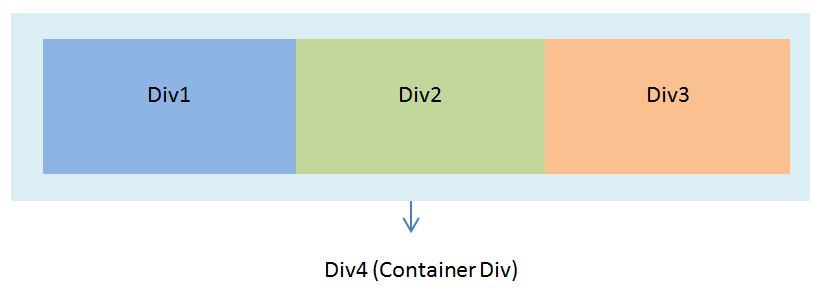
use the following code to create the above scenario using CSS and HTML
</pre>
<!DOCTYPE html>
<html>
<head>
<style type="text/css">
.container
{
float: left;
clear: none;
height : 140px;
width : 720px;
background-color:yellow;

}
.left
{
height : 100px;
width : 200px;
background-color:blue;
float: left;
clear: none;
text-align:center;
margin:20px;
}
.middle
{
height : 100px;
width : 200px;
background-color:green;
float: left;
clear: none;
text-align:center;
margin:20px;
}
.right
{
height : 100px;
width : 200px;
background-color:red;
float: left;
clear: none;
text-align:center;
margin:20px;
}
</style>
</head>
<body>
<div>
<div> left</div>
<div> middle</div>
<div>rght</div>
</div>
<br/><br/><br/><br/><br/><br/><br/><br/><br/>
<p>Visit for more : http://futuredev.info/ </p>
</body>
</html>
<pre>
]]>Exmaple : I’m going to edit 100 images with following edits
- re-size 600px * 400px
- increase brightness
- reduce image size
- save
Step 01
create your action script go window—–>actions
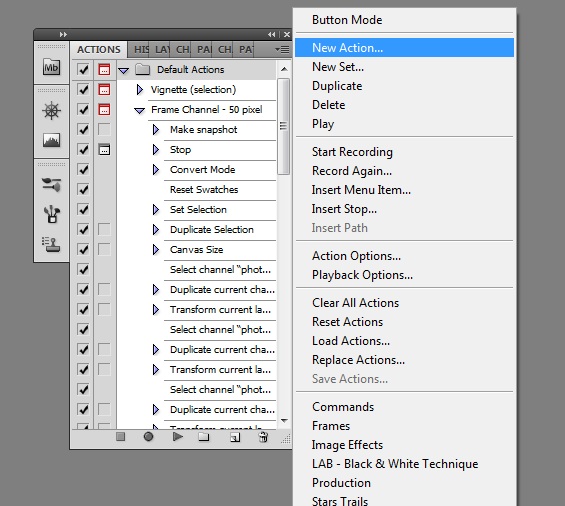
click on new action —> Record then edit a single image with following editing
- re-size 600px * 400px
- increase brightness
- reduce image size
- save
then stop recoding action using the square mark in bottom of the action pallet my recorded action will appear like the following
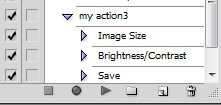
Step 02
Now i am going to do the same thing in 100 times using Photoshop automation . Go —> File —>Automation —> Batch
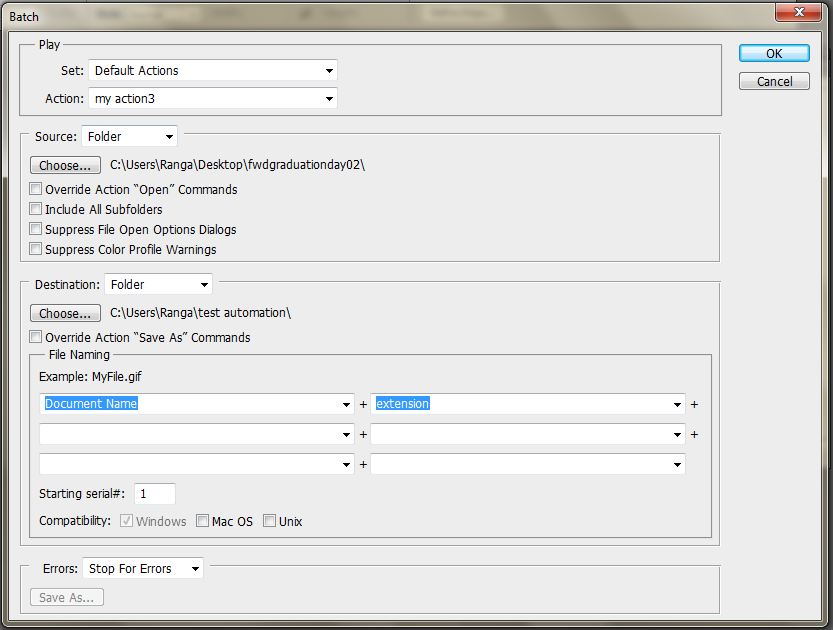
in the above window you may have to do some configuration
(01) Make sure to select an action using the drop down menu near Action
(02) Select the source folder that included the 100 of images in your computer
(03) Select the destination folder to save the output
(04) Click ok
That’s all try it it will save your time more… 
What is Zend Framework
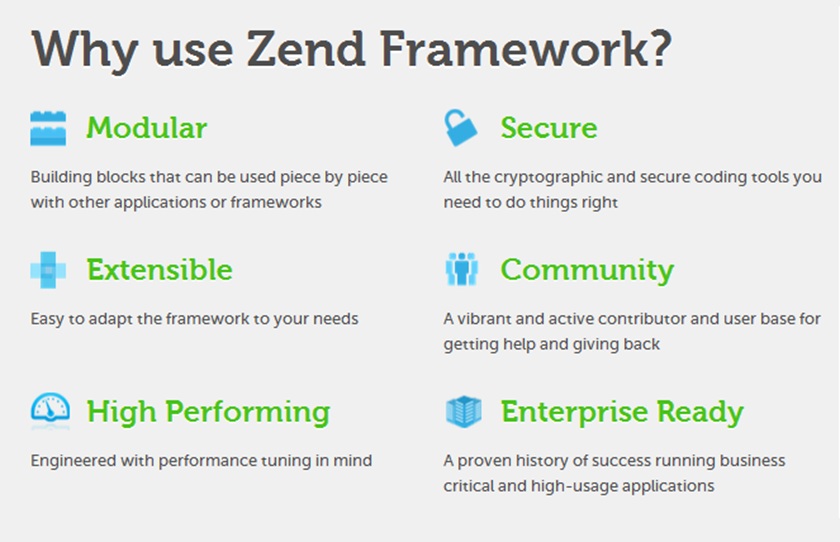
Requirements for create a Zend project
Installation
Setting up the environment variable for Zend frame work and PHP
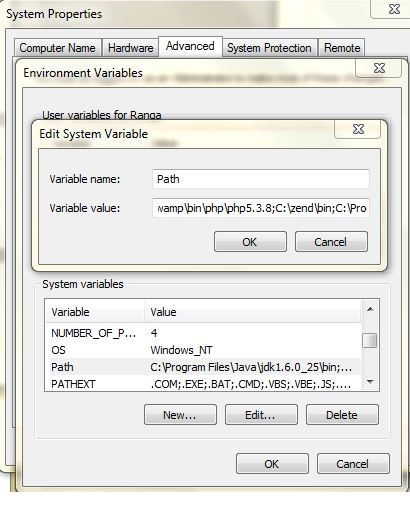
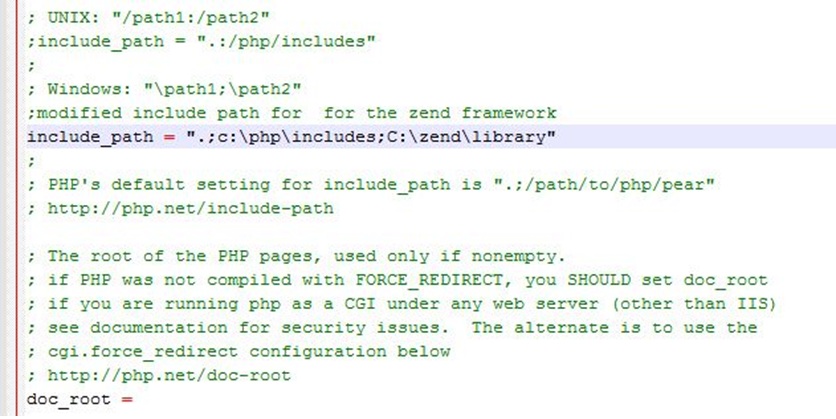
Setup the include path for in php.ini for zend framework
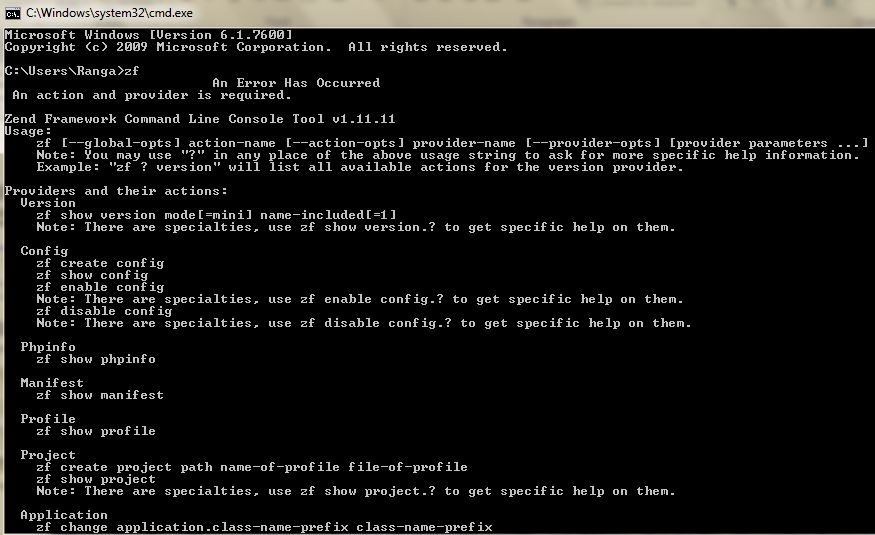
Testing the Zend (just type zf and enter on you terminal)
Create your first project
Zend command : zf create project demo
It will generate the zend project folder structure as follows
Make sure to create your project in the web root directory
Ex :
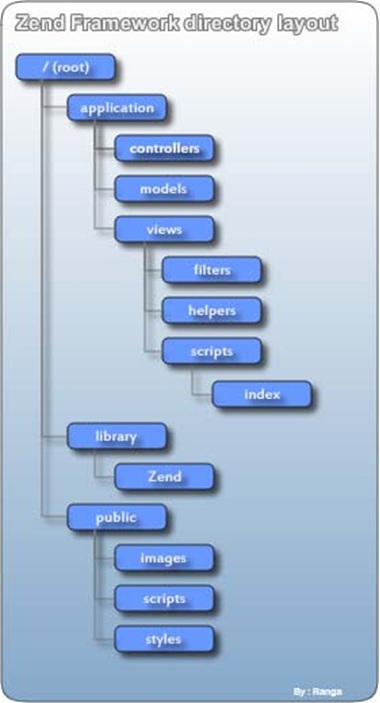
zend project folder structure
How to test it
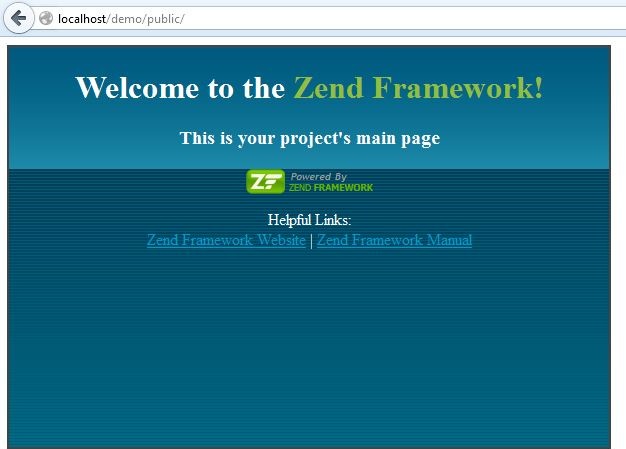
server is up and running
Set up the development environment with Netbeans IDE
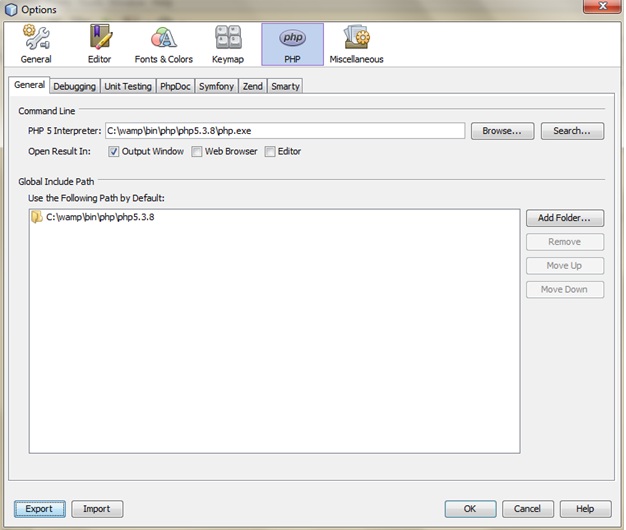
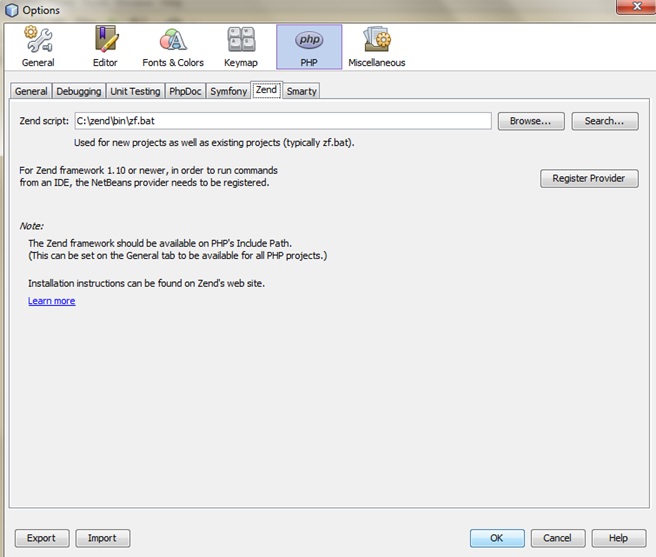
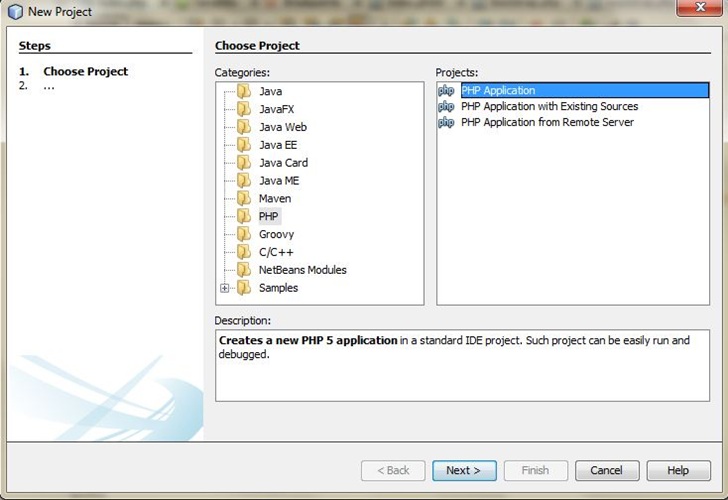
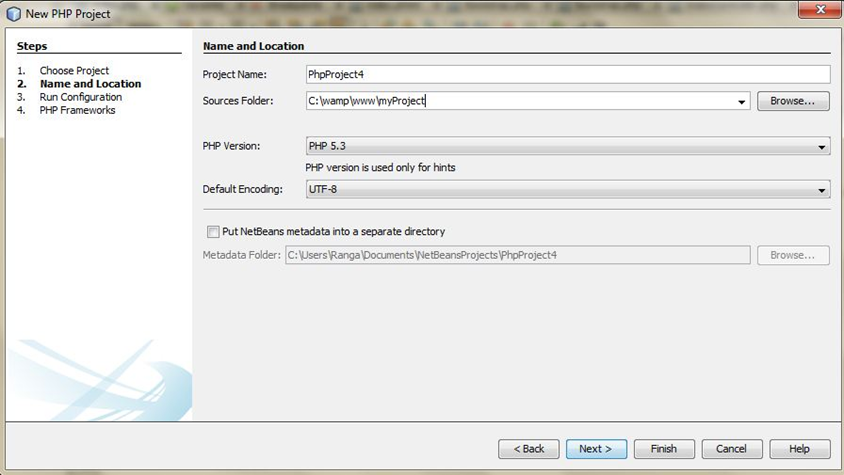
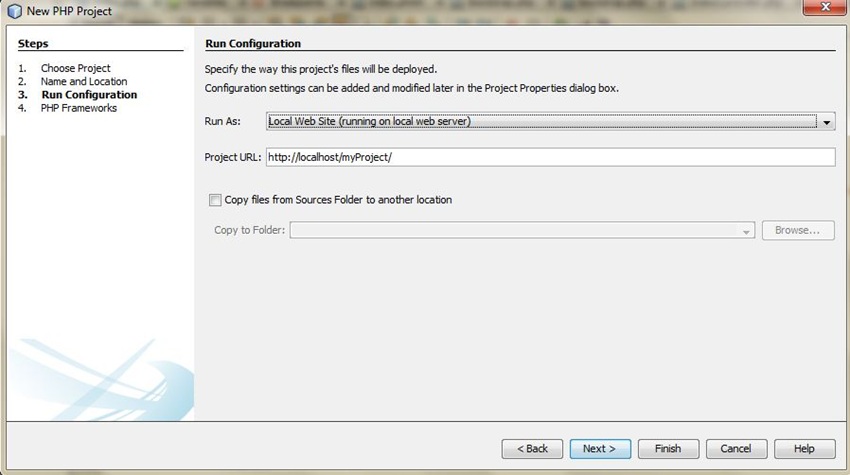
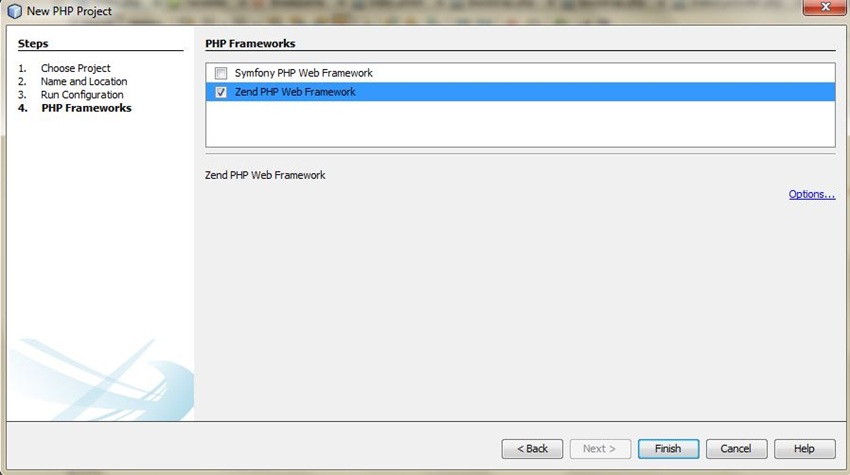
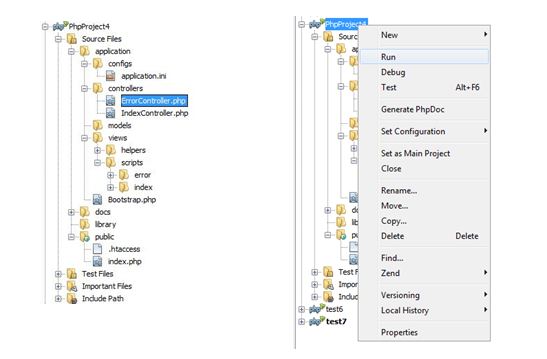
Once you created a Zend project you can see the following folder structure as default
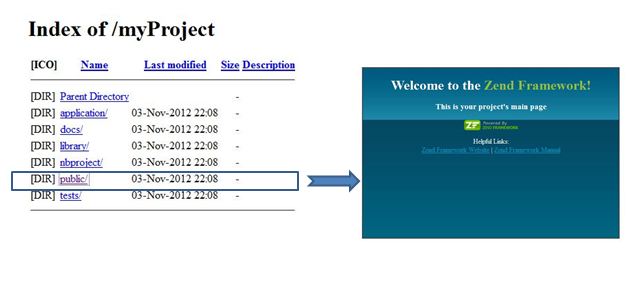
Once you run the project can see the main folder structure on your default browser
How to debug a PHP project with Netbeans
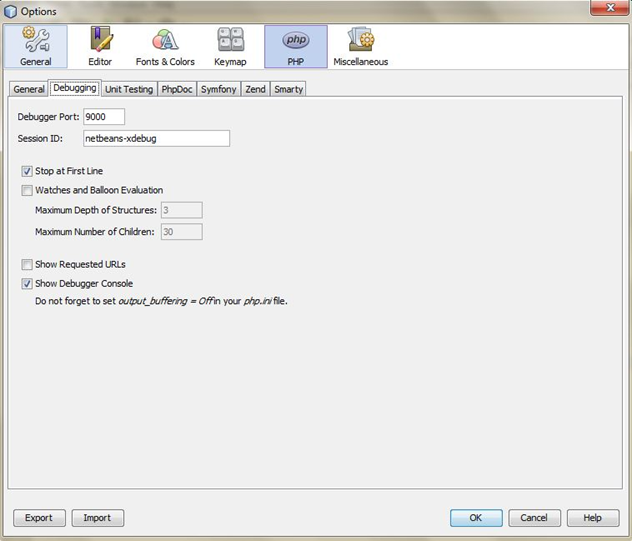
![Add these lines on [xdebug] php](/wp-content/uploads/2013/04/Add-these-lines-on-xdebug-php.jpg)
CSS sprites are a way to reduce the number of HTTP requests made for image resources referenced by your site. Images are combined into one larger image at defined X and Y coorindates. Having assigned this generated image to relevant page elements the background-position CSS property can then be used to shift the visible area to the required component image.
This technique can be very effective for improving site performance, particularly in situations where many small images, such as menu icons, are used. The Yahoo! home page, for example, employs the technique for exactly this.
Example in steps
Step 01
Create a one image with all necessary images included. in this example i am using Adobe Photoshop tool for creating image. It is better to use image type as .PNG

example image using Photoshop
Step 02
Get measurement in each and every small images. In Adobe Photoshop there is a tool called ruler tool . You want the following measurements
- width of small images
- height of small images
- X and Y coordination of small images

getting measurement using ruler tool
in this example i want to get the measurements of text “Ranga”
it was ,
width : 77px height : 45 px
X : 1px Y : 6px ( rounded measurements)
now i am going to use the small image “Ranga” in many places in a web page using CSS and HTML .
Step 03
creating the CSS file using the above measurement
.signature {
background-position:1px 6px;
height:45px;
width:77px;
background-image:url('images/web_icons.png');
}
Step 04
use HTML to display the image part for any place in a web page
<div class="signature">
 </div>
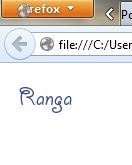
as this example you can use other small images in any place in a web page . use Photoshop tool for get measurements. its simple reusable and cool
download the source code form the below
]]>http://futuredev.info/ ]]>