

Photoshop is very powerful but sometimes simple tasks can get repetitive and tedious. Here’s a look at how to automate just about anything in Photoshop using Photoshop actions.
Exmaple : I’m going to edit 100 images with following edits
- re-size 600px * 400px
- increase brightness
- reduce image size
- save
Step 01
create your action script go window—–>actions
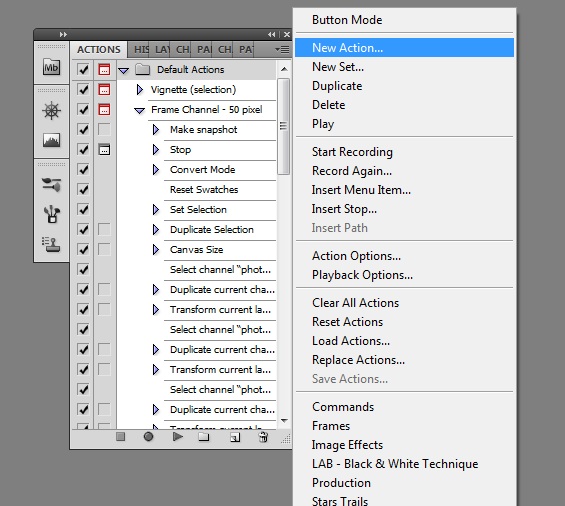
click on new action —> Record then edit a single image with following editing
- re-size 600px * 400px
- increase brightness
- reduce image size
- save
then stop recoding action using the square mark in bottom of the action pallet my recorded action will appear like the following
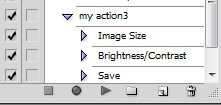
Step 02
Now i am going to do the same thing in 100 times using Photoshop automation . Go —> File —>Automation —> Batch
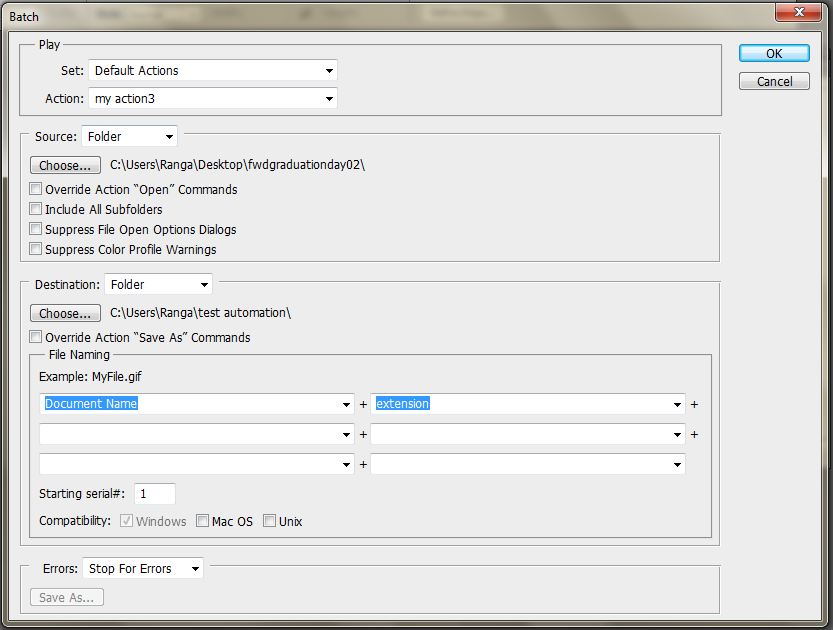
in the above window you may have to do some configuration
(01) Make sure to select an action using the drop down menu near Action
(02) Select the source folder that included the 100 of images in your computer
(03) Select the destination folder to save the output
(04) Click ok
That’s all try it it will save your time more… 


signapse2.Heteml.jp
May 17, 2013 at 8:59 pm (UTC 0) Link to this comment
Greetings I am so thrilled I found your weblog,
I really found you by accident, while I was looking on
Aol for something else, Nonetheless I am here now and would just like to say thanks for a fantastic
post and a all round thrilling blog (I also love the theme/design), I
don’t have time to browse it all at the moment but I have book-marked it and also added in your RSS feeds, so when I have time I will be back to read much more, Please do keep up the fantastic job.